|
|
使用 Mac OS X 系統內建的抓圖功能來截取螢幕畫面時,預設會使用「前綴+日期+時間」這種命名方式,雖然下面的修改方式可以更改抓圖後圖檔名稱的「前綴」,不過後面還是煩死人的一長串:
- defaults write com.apple.screencapture name [檔名前綴]
- defaults write com.apple.screencapture name 抓圖
如果你想去掉截圖檔名裡面一堆時間日期的文字敘述、讓檔案名稱改為比較簡短乾淨的命名方式,可依照下面方式修改。
開啟終端機視窗,貼上並執行:
- defaults write com.apple.screencapture "include-date" 0
如果要列出你做了什麼修改,可以執行:
- defaults read com.apple.screencapture
截圖時,如果是抓整個視窗的畫面,取消視窗周圍的陰影:
- defaults write com.apple.screencapture disable-shadow -bool true
--------
下面在新版 macOS 不能用了..........
注意!是整個預設名稱都改掉喔!
- sudo su
- cd /System/Library/CoreServices/SystemUIServer.app/Contents/Resources/zh_TW.lproj
或 簡體中文系統:
- cd /System/Library/CoreServices/SystemUIServer.app/Contents/Resources/zh_CN.lproj
進入資料夾後執行:
- plutil -convert xml1 ScreenCapture.strings
再編輯:
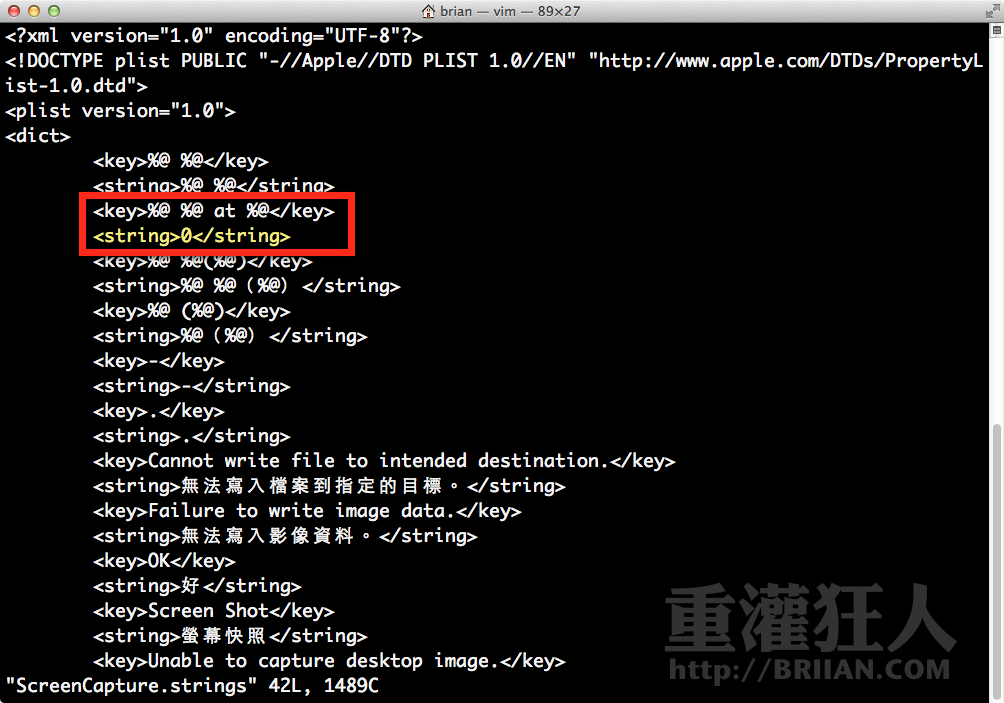
編輯時尋找:
- <key>%[url=home.php?mod=space&uid=32362]@[/url] %[url=home.php?mod=space&uid=32362]@[/url] at %@</key>
- <string>%[url=home.php?mod=space&uid=32362]@[/url] %[url=home.php?mod=space&uid=32362]@[/url] %@</string>
將
- <string>%[url=home.php?mod=space&uid=32362]@[/url] %[url=home.php?mod=space&uid=32362]@[/url] %@</string>
改成
- <string>0或其他你喜歡的文字</string>
(說明:第一個 %@ 是前綴,第二個 %@ 是日期,第三個 %@ 是時間)
完成後存檔退出,再執行:
- sudo plutil -convert binary1 ScreenCapture.strings
- killall SystemUIServer
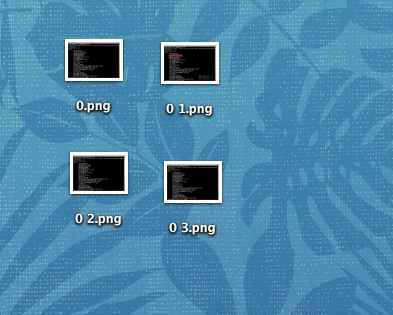
完成後,抓圖時,預設會以「0.png」、「0 1.png」、「0 2.png」..等方式自動命名,不用擔心名稱重複,也不會有一長串的文字或數字。
|
|